HomePage
About Me

My name is Karlo Koelewijn, a Medior developer with experience since 2018.
On my previous game-dev study on GLU (Grafish Lyceum Utrecht Niv. 4) i learned C#, PHP, and SQL.
I choose to Learn C++ for my advanced elective course because it looked interesting to learn a deeper language and how processors work.
I had a slight interest in micro-controllers before starting at Fontys, I also enjoy reading manga and don't find it strange when I catch myself reading through documentation of projects or libraries.
In my free time I also play game (solo and multiplayer) from multiple genres.
After learning some networking coding on GLU i got myself a raspberry pi and dove into the rabbit-hole known as a homelab, and currently have a few pi's and my own mail-server.
how am i hosting this?
This website is hosted on a raspberry pi running a nginx docker image.
which is accessed through an reverse proxy on my VPS (virtual private server).
Skills
- C/C++
- CMake
- Make
- git
- basic circuit design
- Golang
- Bash
- C#
- php
- Flutter
why no graphs here? because they rarely make sense
projects
Titles and images redirect to the project page
left and right arrow key to flip through the pages in order
Dice roller project (coming soon)
A macro-pad style device that works stand-alone to rolls dice with analog noise to have less pseudo-random results.
Vinky-Pi
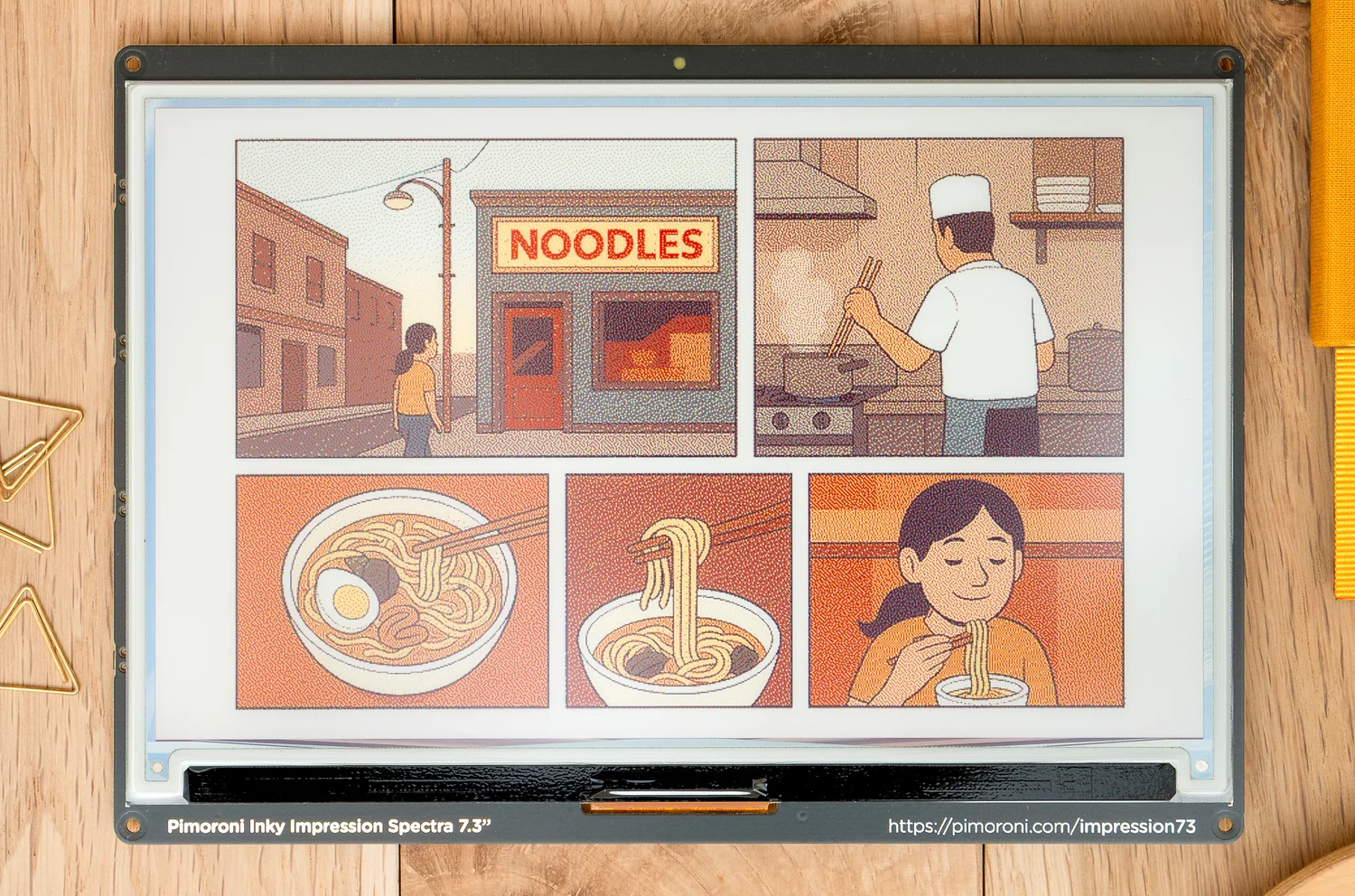
An attempt to rewrite the python code due to a personal hatred for python
Dual Inventive assignment
A proof-of-concept project to retrieve data from batteries and solar panel over wireless and transmit them over CANopen
Internship assignment
My internship assignment at Amabox Systems.
Pratt parser
// simplified javascript
let sum = function(a, b) {
  return a + b;
}
⬇️
A recursive decent pratt parser that creates an AST (Abstract Syntax Tree) from code.
Visual Studio TaskList Viewer Unity/C#
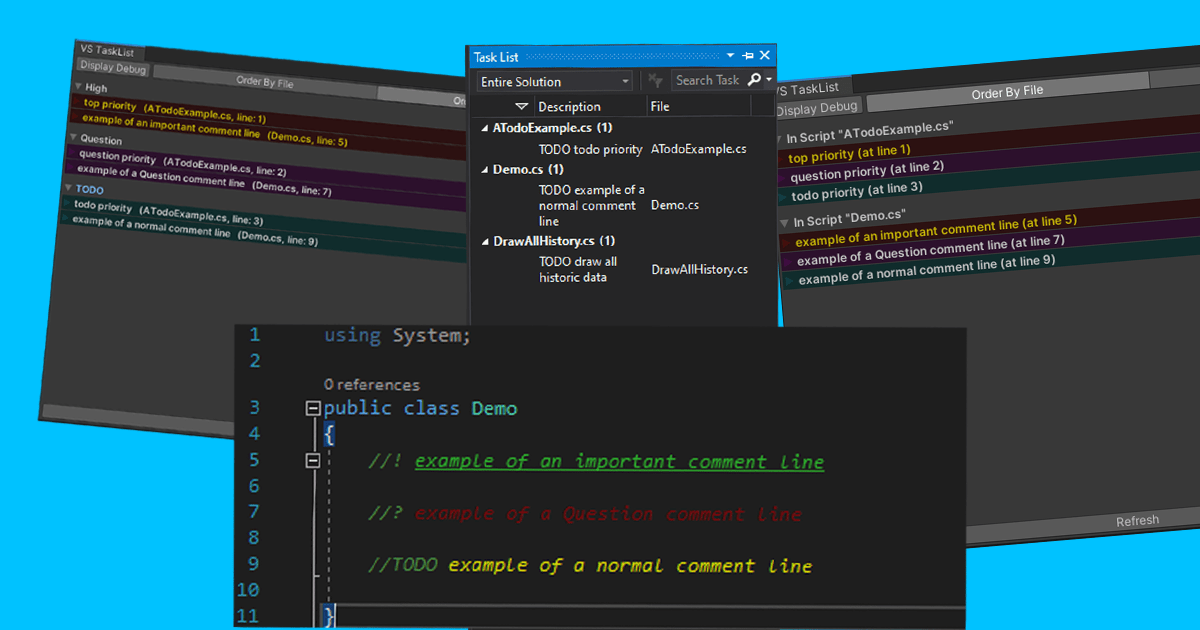
A Unity Tool for developers to keep track of todo-comments in their Unity project.
Editor tool for Unity 2018+
Reviews
Thank you! 5/5★
bykazNoTabi
An incredibly powerful tool! One of the best freebies! 5/5★
byHoloMikeyz
Thanks for usefull asset. 5/5★
bySooNice
guiBase Library (C++)
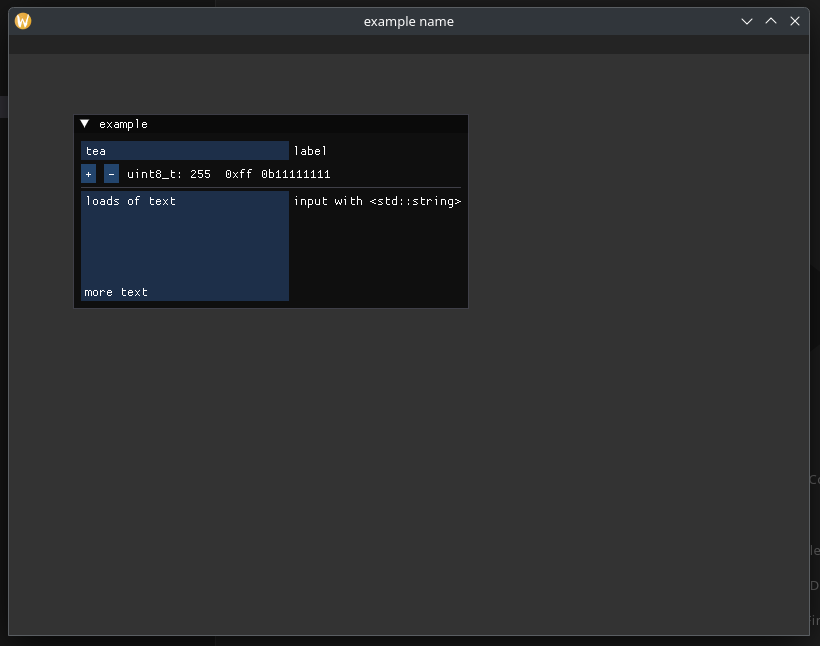 library for creating cross-platform gui apps
using glfw and vulkan to render imgui
this allows the user to focus on making something without having to focus on specific platform or toolkit quirks
works on:
- linux
- windows
- mac (untested as i don't own one)
stm32 cmsis car
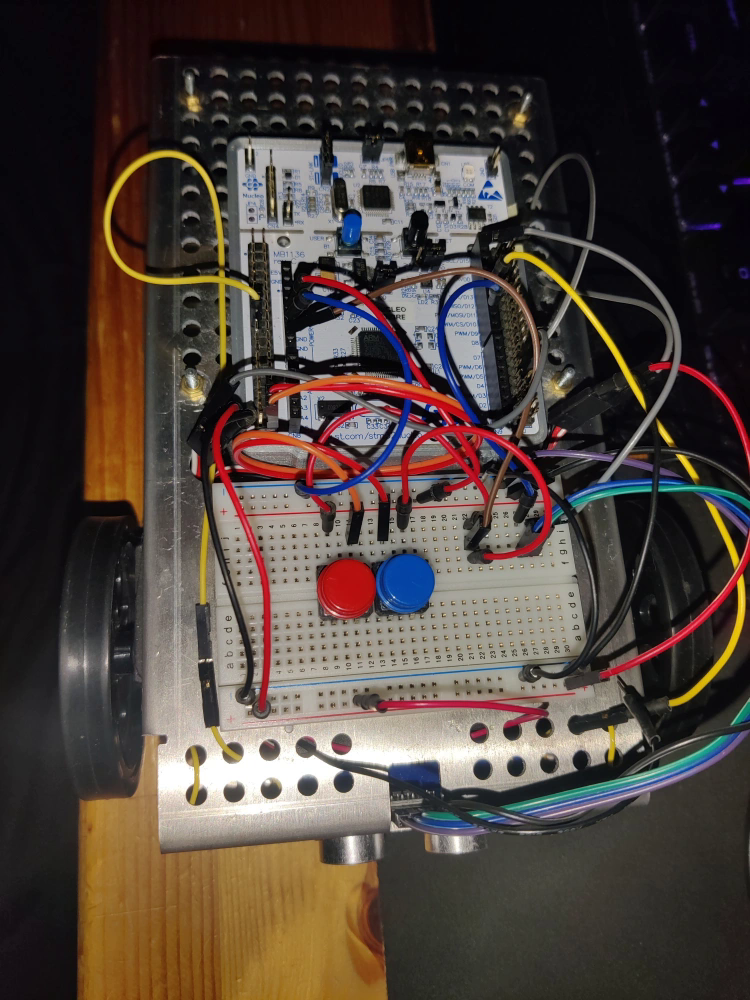
using a nucleo f303re and cmsis c++ code to drive a car.
it drives forward to keep a set distance from an obstacle.
Discord Bot C#
github page
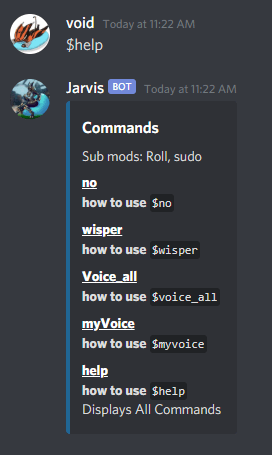
Discord bot written in C# from scratch with the Discord.Net api
Game of Life console C++
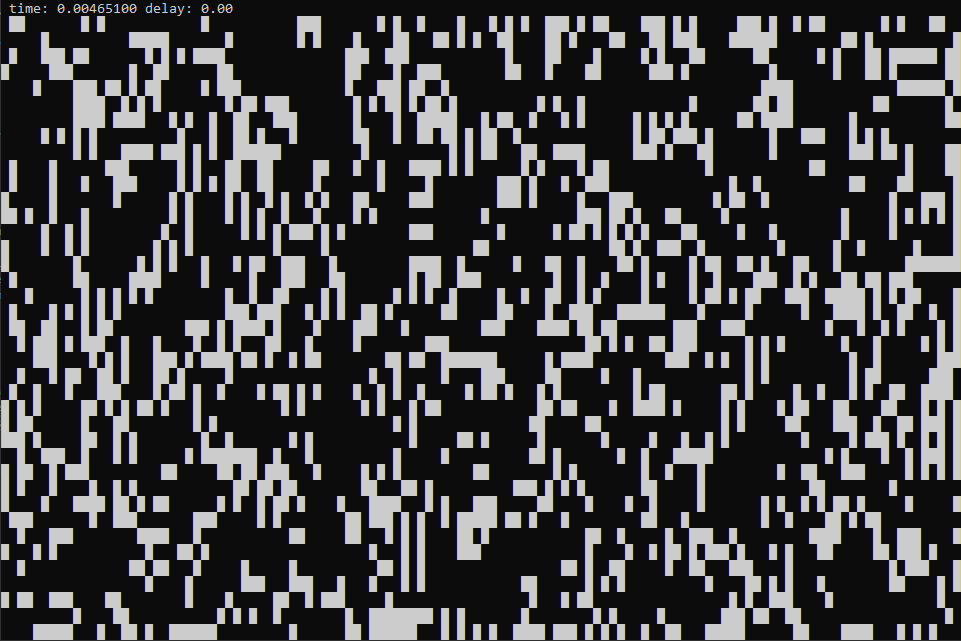
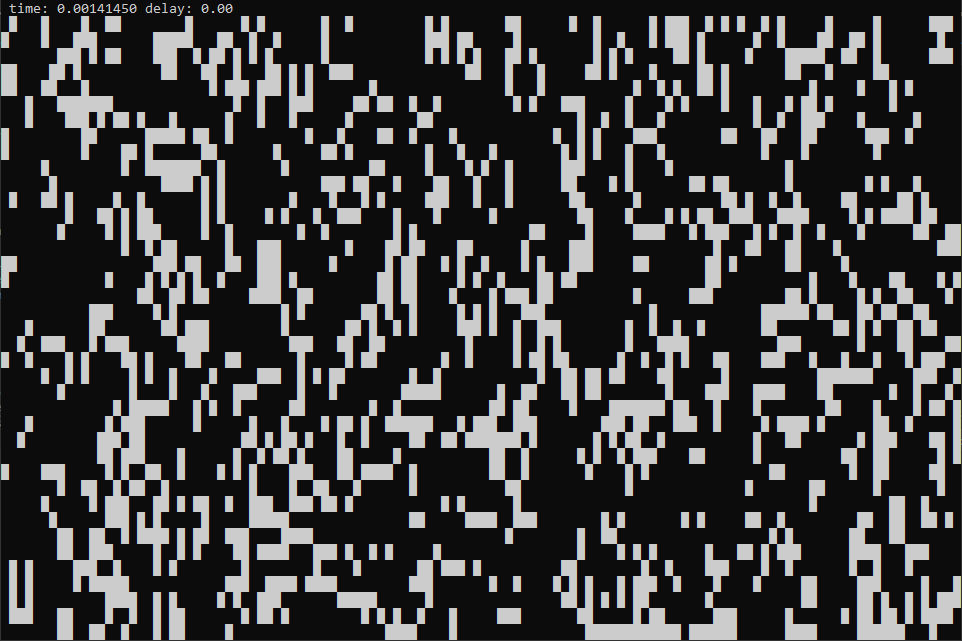
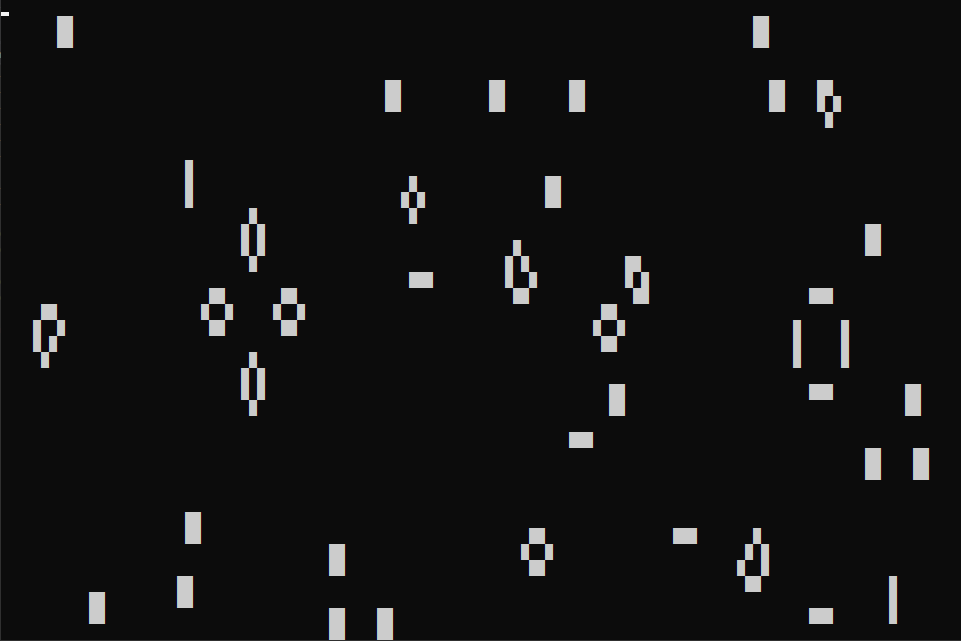 A C++ project displaying Conway’s Game of Life in the Console.
SerieList Editor
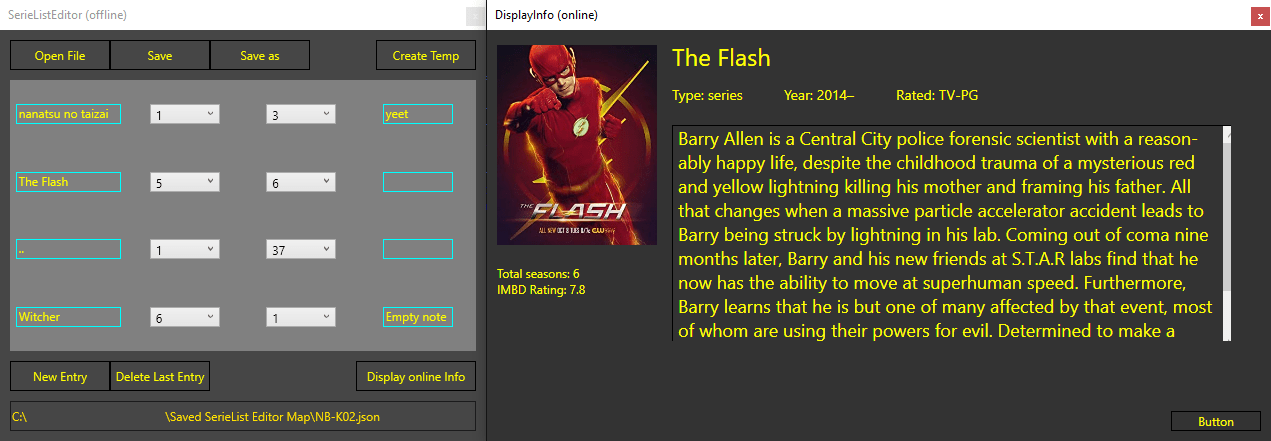 Simple program to offline keep track of where you are in a series.
it can also pull info about the series from OMDB
Vinky-pi
this project is still a work in progress

This is the Inky Impression, a 7.3" E-paper display with the ability to display with 6 colors. The one problem i have is a personal pet-peeve of mine, I don't like python and don't trust the dev using it on a security aspect, but do want to make use of an E-paper display i bought.
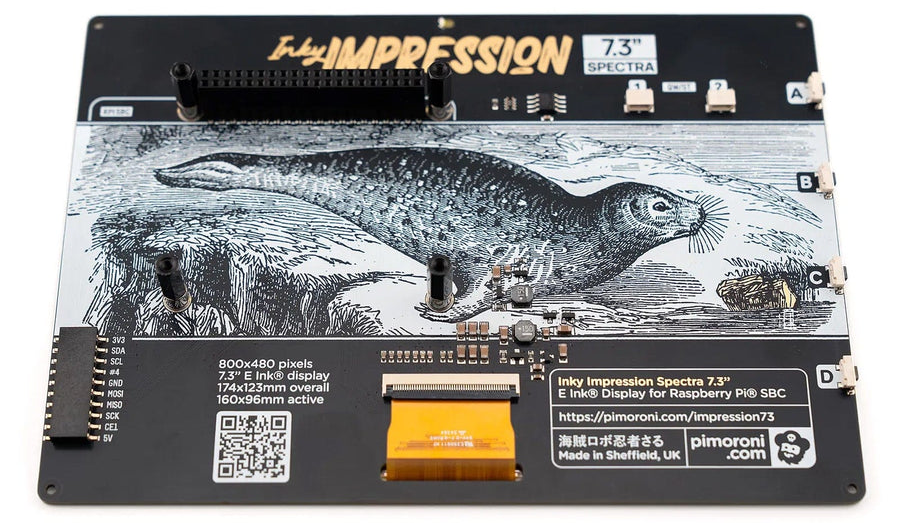
It can be driven by any device that has a raspberry pi 40-pin-compatible header, and I am using a pi zero 2 w
The reference project is fully written in Python and the problem I have is the python webApp part, as an interpreted language it can change at any moment without the end user knowing. It becomes a bigger problem when run as a system-d module, in other words as the root user, which is the default of the reference project. to solve this I plan to reverse engineer this program and make a new implementation in another language (probably go and c++ as they are compiled).
one of the difficulties I encountered early on was that wiringPi got deprecated by the maintainer.
This is due to other SBC (single board computer) projects were using the library while the maintainer explicitly said he only wrote it for the pi.
current status of the project
- frontend
- finishing touches
- adding widget configuration
- backend
- working on
- updating config file from json to a toml format
- time based interval trigger for updating the display after the specified duration
- saving above duration/setting in a user-accessible config file
- needs work
- finalizing communication between driver and backend
- working on
- driver
- communication between driver and display
- finalizing communication between driver and backend
Dual Inventive assignment
We got asked by Dual Inventive to make a proof-of-concept for them that reads info from their standardized batteries and solar panel modules and send that data over CANopen. This was because they currently had no telemetry and/or information on the batteries unless they manually pulled out their phone and looked in separate apps for the respective component. They also asked us to look into CANopen as an alternative for their custom CANbus messaging schema to make it easier to iterate in their development.
My biggest contribution in this project wat managing the CI pipeline. This had a few complications due to a few problems in my private life.
Internship assignment
I was asked to setup a AI-powered chatbot for the clients of Amabox-systems to help reduce the load on the support staff. One of the requirements was that everything needs to be run in-house so they can comply with EU privacy regulations and keep control over the data.
While this was more a Software and Infrastructure internship I did decide to take the challenge due to my home-lab experience and prior experience in building web-services during my game-dev time and personal projects even though I have a technology (embedded) school path.
Pratt parser (recursive decent parser)
A pratt parser consists of 2 components (lexer, parser) that compliment each other. The lexer reads in a file (usually containing code) and turns it into tokens (similar but different from LLM's) according to syntax rules.
An example that most people should know is a math sum: \( 3∗(5+9)^2 \)
the tokenizer reads over it character by character, and makes a list of tokens with info about it using the following syntax rules:
E –> E + T | T
T –> T * F | F
F –> ( E ) | id
| shorthand | name | function |
|---|---|---|
E | Expression | Expressions define the rules of the language |
T | Terminal | Terminals are end-points for expressions, usually a leaf node of a syntax tree |
F | Functor | Functor's are classes of inputs such as Literals or Identifiers |
The lexer will turn the above sum into the following with the format "<value>" (<type> [<lineNr>:<columnNr>])
"3" (ATOM [1:1])
"*" (OPERATOR [1:2])
"(" (OPERATOR [1:3])
"5" (ATOM [1:4])
"+" (OPERATOR [1:5])
"9" (ATOM [1:6])
")" (OPERATOR [1:7])
"^" (OPERATOR [1:8])
"2" (ATOM [1:9])
An atom in this case stores a value whereas an operator (as the name implies) operates on its values. The tokens are stored as a list and passed to the parser.
The goal of the parser is to make an AST (Abstract Syntax Tree) from the tokens.
To parse the tokens from the lexer it looks at the information of the current and next token to determine what type of node will be made.
When looking at the math rules it can be represented in 2 token types: Atom and Operator.
Atom representing a number (or a value), and Operator being an operation that needs to be preformed on 2 atom's.
to get the desired behavior the parser has to call itself recursively to solve inner parts of expressions that get added to the AST.
The above token-list turns into the following AST:
graph
  a(3)
  op1{{"✖"}}
  b(5)
  op2{{"➕"}}
  c(9)
  op3{{"^"}}
  d(2)

  op1 --- a
  op1 --- op3
  op3 --- op2
  op3 --- d
  op2 --- b
  op2 --- c
To get the solution of the sum we just have to walk the AST and resolve the operations:
- 3 *
result_of_^ result_of_^=result_of_+^ 2result_of_+=node_left+node_right
These same steps are used to write a parser as part of a compiler (using simplified javascript as an example)
let sum = function(a, b) {
  return a + b;
}
| TokenType | value |
|---|---|
| Identifier | let |
| Identifier | sum |
| Punctuator | = |
| Identifier | function |
| Punctuator | ( |
| Identifier | a |
| Punctuator | , |
| Identifier | b |
| Punctuator | ) |
| Punctuator | { |
| Identifier | return |
| Identifier | a |
| Punctuator | + |
| Identifier | b |
| Punctuator | ; |
| Punctuator | } |
graph LR
  %%{ init: { 'flowchart': { 'curve': 'linear' } } }%%
  o4{{=}}
  n4(sum)
  f1(function)
  n5(a)
  n6(b)
  s1(return)
  o5{{➕}}
  n7(a)
  n8(b)

  o4 --L--- n4
  o4 --R--- f1
  f1 --L--- n5 --- n6
  f1 --R--- s1
  s1 --- o5
  o5 --L--- n7
  o5 --R--- n8
Visual Studio TaskList Viewer
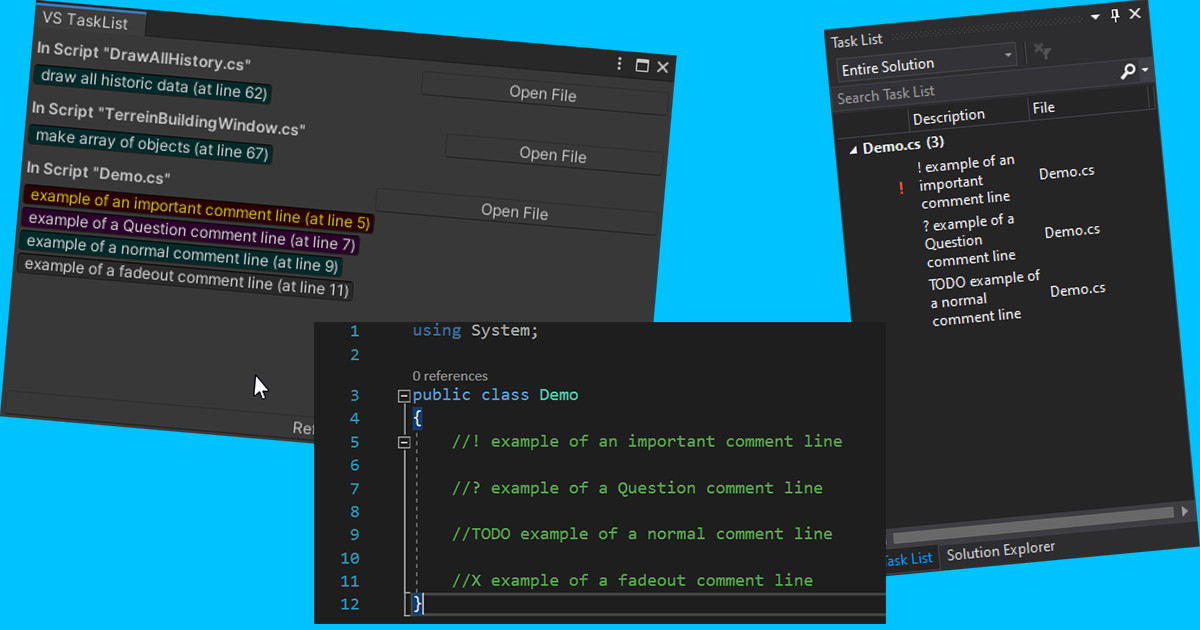
A Unity Tool for developers to keep track of todo-comments in their Unity project.
works on both gameplay and Editor scripts, inside a custom Unity Editor window.
you can decide for yourself how you plan to use it, it works on both game-play scripts and editor scripts and won't be taken along when you make your build.
how to use
inside any
.csfile inside the project.
//! (Important Comment, Will appear above all comments of that file)

//? (Question Comment, Appears underneath the //! and signifies a Question for yourself/others

//TODO (TODO comment, Appears underneath the //? and signifies a task or reminder)
reviews
kazNoTabiThank you! 5/5★previously, I was searching using the Grep, but with this asset, the hassle has been reduced.
HoloMikeyzAn incredibly powerful tool! One of the best freebies! 5/5★I have a lot of assets. This one assets is near the top of my list in terms of productivity.
All the TODO items you wrote in code are in a list for you to peruse.
This one tool has really brought the ability to focus on the task needed to ship code. Well done!
SooNiceThanks for usefull asset 5/5★Really like it.
guiBase Library

I made this library to simplify making gui apps in c++.
it uses GLFW and dearImGui with vulkan rendering.
this allows the user to focus on making an application without having to worry about most cross-platform nicknacks.
the included example shows a working example of how to setup your cmake project, entrypoint and layers.
each layer is meant to be its own window, below is a minimal example.
class exampleLayer : public guiBase::Layer {
public:
    exampleLayer() = default;

public:
    // void onAttach() override {
    // }

    void onUpdate() override {
        if (ImGui::Begin("example")) {
            ImGui::Text("%s", "example text");
        }
        ImGui::End();
    }

    // void onDetach() override {
    // }

private:
};
I have been using this library for multiple personal projects and in combination with other libraries without issue
cmsis car
TLDR -> Source Code
My Nucleo car in C++ CMSIS
This project had the goal to drive the nucleo car with the following challenges.
using 2 servos (using pwm) pid controller (distance control) ultra sonic distance sensing (using i2c) MCP (manual control pannel) uart control
de intent behind this project is to learn CMSIS level programming on Arm Cortex cores. this was done as part of my HBO-ICT tech embedded systems developer. it continuously drives forward until it detects a obstacle with the distance sensor.
class diagram
all diagrams can be found here (github also allows you to zoom in on each diagram)
classDiagram
  class CarSystem {
    <<active>>
    +CarSystem(osMessageQueueId_t id, IDistanceSensor& sensor, ManualControlPanel& MCP, MotorController& controller)
    +Setup() bool
    +Update()
    -osMessageQueueId_t queueId //distance queueId
    -SensorMsgData data
  }
  class MotorController {
    <<active>>
    +MotorController(osMessageQueueId_t id, uint8_t minDist, IMotor& leftMotor, IMotor& rightMotor, IFeedbackSensor& leftSense, IFeedbackSensor& rightSense)
    +Setup()
    +Loop()
    +SetSpeed(uint16_t speed)
    +SetDistance(uint8_t distance)
    -osMessageQueueId_t queueId
    -uint8_t minDetectDistance
    -IMotor* motorLeft
    -IMotor* motorRight
    -IFeedbackSensor* senseLeft
    -IFeedbackSensor* senseRight
    -Pid pid
  }
  class IMotor {
    +Setup() bool
    +IsReversed() bool
    +SetSpeed(int8_t value)
  }
  class ServoMotor {
    +ServoMotor(NucleoPin pinMotor, HardwareTimer& timer, uint8_t ccChannelNum, bool reversed)
    -NucleoPin motorInputPin
    -HardwareTimer tim
    -bool isReversed
    -uint8_t ccrChannel
    -uint8_t maxSetSpeed = 100
    -uint8_t servoIdleValue = 1500
  }
  class ManualControlPanel {
    <<active>>
    +ManualControlPanel(osMessageQueueId_t btnId, IButton& btn0, IButton& btn1)
    +Setup()
    +Loop()
    +SetPid(Pid& p)
    -HandleSelectedBtn(BtnMsgData data)
    -CallBtnAction(BtnMsgData data, IButton btn)
    -osMessageQueueId_t queueId
    -IButton but1
    -IButton but2
    -Pid* pid
  }
  class IBtnIRQ {
    +HandleIRQ()
    +SetupIrq()
  }
  class IButton {
    +shortPress() action
    +LongPress() action
  }
  class Button {
    +Button(NucleoPin inputPin, IRQn_Type irq, osMessageQueueId_t id, Action actionShort, Action actionLong)
    -NucleoPin btnPin
    -osMessageQueueId_t id
    -IRQn_Type irq
    -volatile bool triggered
    -volatile uint32_t startTime
    -volatile BtnMsgData data
    -Action shortPressCallback
    -Action longPressCallback
  }
  class IDistanceSensor {
    +GetDistance() uint8_t
  }
  class HC_SR04_DistSensor {
    +HC_SR04_DistSensor(NucleoPin& echo, NucleoPin& trigger, HardwareTimer tim)
    +Setup(uint32_t prescaler, uint32_t arrValue, uint32_t outputCCValue, const uint8_t outputChannel, const uint8_t inputChannel1, const uint8_t inputChannel2) bool
    -NucleoPin* echoPin
    -NucleoPin* triggerPin
    -HardwareTimer timer
  }
  class Pid {
    +PID(int16_t min, int16_t max, float kp = 8.1f, float ki = 10.71428571f, float kd = 1.5309f)
    +Calculate(float target, float lastTarget) int16_t
    +ResetValues() void
    +updateKP(float val) void
    +updateKI(float val) void
    +updateKD(float val) void
    +GetKP() float
    +GetKI() float
    +GetKD() float
    -int16_t min
    -int16_t max
    -float tau
    -int16_t error
    -int16_t prevError
    -int16_t prevMeasurement
    -float timeSec
    -float proportionalOut
    -float integratorOut
    -float differentiatorOut
    -float output
    -float kp
    -float ki
    -float kd
    -float defaultKp
    -float defaultKi
    -float defaultKd
  }
  class IFeedbackSensor {
    +Setup() bool
    +Update()
    +GetSpeed() float
  }
  class FeedbackSensor {
    +FeedbackSensor(NucleoPin& inputSignal, HardwareTimer timer)
    -CalcDeg(int32_t curDuty) int32_t
    -CalcRpm(float delta, int32_t time) float
    -NucleoPin InputSignalPin
    -float speed
    -float delta
    -uint32_t curTime
    -uint32_t curDuty
    -uint32_t angleCur
    -uint32_t angleLast
  }
  class PinMode {
    <<enum>>
    digital_input
    digital_input_pullup
    digital_output
    altMode
  }
  class NucleoPin {
    +NucleoPin(GpioTypedef* block, uint8_t pinNr, PinMode mode)
    +NucleoPin(GPIO_TypeDef* block, uint8_t pinNr, AltModeValue val)
    +SetAltMode(AltModeValue value)
    +Setup() bool
    +Write()
    +Read() bool
    +GetPinNr() uint8_t
    +GetPinBlock() GPIO_TypeDef*
    -GpioTypedef block
    -uint8_t pin
    -PinMode mode
  }
  class AltModeValue {
    uint64_t value;
    uint32_t low;
    uint32_t high;
  }
  class HardwareTimer {
    +HardwareTimer(TIM_TypeDef* timer);
    +Init(uint32_t prescaler, uint32_t arrValue, uint32_t outputCCValue, const uint8_t outputChannel, const uint8_t inputChannel1, const uint8_t inputChannel2) bool
    +SetTimerEnable() void
    +SetPrescaler(const uint8_t prescalerDivider) void
    +SetEnablePeripheralClock() void
    +SetEnableCCModex(const uint8_t channel, const uint8_t ccxs, const uint8_t ocxm) void
    +SetEnableCCx(const uint8_t channel, const uint8_t ccxe, const uint8_t ccxp, const uint8_t ccxnp) void
    +SetCCRxRegister(const uint32_t CCRvalue, const uint8_t registerNo) void
    +SetAutoReload(const uint32_t ARRvalue) void
    +SetSlaveModeResetFP1() void
    +GetCaptureCompareRegister1() uint32_t
    +GetCaptureCompareRegister2() uint32_t
    +GetCaptureCompareRegister3() uint32_t
    +GetCaptureCompareRegister4() uint32_t
    +GetTimerCount() uint32_t
    -TIM_TypeDef* timer;
  }
  class BtnMsgData {
    +int butNr
    +int duration
  }
  class SensorMsgData {
    +uint8_t distance
  }

  ManualControlPanel o-- BtnMsgData
  BtnMsgData --o Button
  CarSystem o-- MotorController
  NucleoPin o-- AltModeValue
  CarSystem o-- ManualControlPanel
  ManualControlPanel o-- "2" IButton
  IBtnIRQ <|.. IButton
  IButton <|.. Button
  CarSystem o-- SensorMsgData
  MotorController o-- "2" IMotor
  MotorController o-- "2" IFeedbackSensor
  MotorController o-- Pid
  MotorController o-- SensorMsgData
  IMotor <|.. ServoMotor
  CarSystem o-- IDistanceSensor
  IDistanceSensor <|.. HC_SR04_DistSensor
  IFeedbackSensor <|.. FeedbackSensor
  HC_SR04_DistSensor o-- NucleoPin
  FeedbackSensor o-- NucleoPin
  ServoMotor o-- NucleoPin
  Button o-- NucleoPin
  NucleoPin o-- PinMode
  FeedbackSensor o-- HardwareTimer
  HC_SR04_DistSensor o-- HardwareTimer
  ServoMotor o-- HardwareTimer
Discord Bot C#

I got curious how bots worked in discord so i made my own using the Discord.Net api and a C# console window.
It has a few simple and some other more complex commands, It was a bit of a challenge to decipher the api but after some careful reading i got it to work.
Seeing it has been a few years since i last looked at the code, it is currently not working due to discord having updated their API.
Bot Commands
- No
-
tell the bot no, it responds with
awh.
-
- Wisper
-
resend the message after the command as the bot.
-
helpModule
- H
-
prints a help message explaining how to use a command.
-
voiceChatModule
- All
-
prints a list of all users in all voice-chats in the discord server
-
- Status
-
prints a list of every user in the voice-call the user is in.
-
diceRollModule
- Roll
-
dnd dice roller. roll a n sided dice:
d20 -
dnd dice roller. roll a n sided dice m number of times:
3d6
-
Game of Life Console

To long didn’t read -> Source Code
This project was a throwaway at first until a friend told me to upload it to my portfolio to show my capabilities in C++ after a few weeks of learning the language.
I kept this as simple as I could, considering I didn’t plan to show it off in the first place and was trying to get it to work.
I used a frame buffer technique I saw on YouTube by Javidx9 using the ‘Windows.h’ and the WriteConsoleOutputCharacter macro.
Below are screenshots of a run
frame 2
frame 3
SerieList Editor

A utility program for keeping track of where you are with your series offline. while being fully offline it does offer OMDb info pages that do require web access.
offline
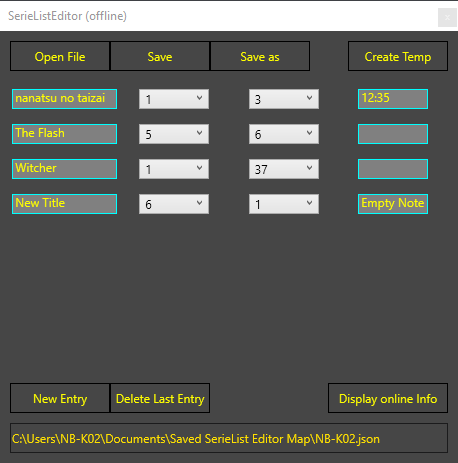
Using a JSON file it keeps track of all the data.
you can type in the title, select which season and episode you are in with a simple dropdown menu and you can leave a note for yourself typing in where you were in the episode or even what you thought of it.
online
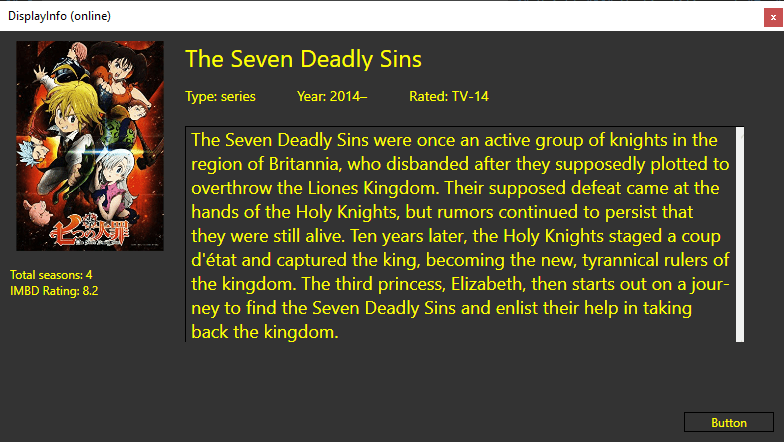
When you click the “Display Online Info button” (assuming you don’t have a typo in the title field) it opens a new window that displays the poster, title, description, age rating, type (series/movie), amount of seasons, IMDB rating and the description.
You can press the button on the bottom of the Online window to open its IMDB page.